Importing from GitHub
A repository is copied from a public https git address into a space, history and all. Goals can follow from its issues; merged pull requests carry no verdict and no signed merge record.
The source
An import starts from the space overview at Import a repository. The source is a clone URL, and it must be https: a source URL reaches a git subprocess, so file://, ssh:// and git's ext:: transport are refused before any of it runs. A URL that carries a username and password is refused too, because it would copy the credential into every progress line the fetch produced; a token goes in its own field instead.
The token is held in memory for this import and forgotten when it runs. It is never written to a column, never returned by any read, and never put on git's command line. If the server restarts before the fetch begins, the import fails and asks to be started again.
Check this source probes the address before anything is created: whether it is reachable, its default branch, and for a GitHub source its description, topics, size and whether it is private, archived or a fork.
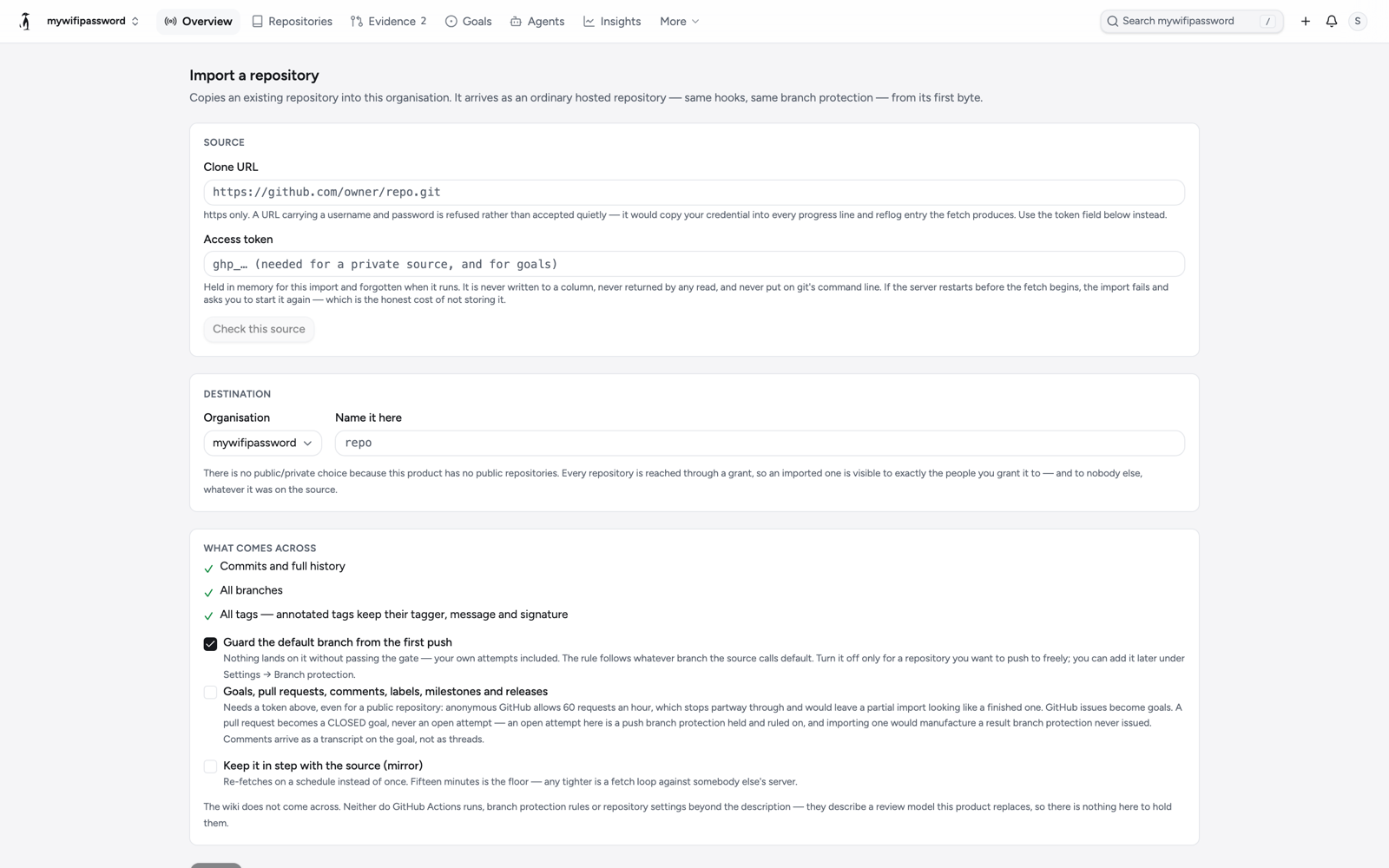
What comes across
- Commits and full history.
- All branches.
- All tags; annotated tags keep their tagger, message and signature.
The imported repository is an ordinary hosted repository from its first byte: the same hooks and the same branch protection as one created here. There is no public or private choice, because every repository is reached through a grant. The wiki does not come across; neither do GitHub Actions runs, branch protection rules or repository settings beyond the description.
Three options:
- Guard the default branch from the first push. Branch protection on whatever branch the source calls default, so nothing lands on it without passing the gate. It can be added later under Settings → Branch protection.
- Goals, pull requests, comments, labels, milestones and releases. Reads the GitHub API, so it needs a token even for a public source: anonymous GitHub allows 60 requests an hour, which stops partway through and would leave a partial import looking like a finished one.
- Keep it in step with the source (mirror). Re-fetches on a schedule instead of once. Fifteen minutes is the floor.
Issues and pull requests
A GitHub issue becomes a goal, with its labels and milestone; an issue type becomes a type: label. Comments arrive as a transcript on the goal, not as threads.
A pull request becomes a goal, never an attempt. An attempt here is a push held at the gate and ruled on, with a head, a base, a verdict and, if it landed, a signed merge record. A pull request that merged on GitHub met somebody else's rules on somebody else's server, and this gate never saw it. So it is written as a closed goal carrying its number and title, and its description states: Imported from GitHub pull request #N, merged there. It never met this gate, so it carries no verdict and no signed merge record. A pull request still open on GitHub becomes an open goal, with a note that pushing its branch here produces an attempt with a real verdict; an import cannot.
A GitHub release is published as a release here only for a tag the fetch brought across, and always as acknowledged unproven, with the import as the reason. See Releases.
The API
An import replaces what a repository contains, so starting one needs repository admin, the same authority as changing its policy. Goals can be imported into an existing repository on their own from a GitHub owner/name or URL.
POST /orgs/{space}/import/preflight
       {"source": "https://github.com/owner/repo.git"}
POST /orgs/{space}/repos/{repo}/import
       {"source": "…", "token": "…", "metadata": true, "mirror_minutes": 60}
GET  /orgs/{space}/repos/{repo}/import      # state, attempts, last_error, refs
POST /orgs/{space}/repos/{repo}/import/retry
POST /orgs/{space}/repos/{repo}/import/goals
{"source": "owner/repo", "token": "…"}While the import runs, the screen polls its status and shows the count of refs brought across; a failed fetch is retried a bounded number of times and the last error is shown.